SANDBOX — test payments and test keys only. This is not the live site.
Duplicate Review app icon: a stack of photos peeling into a purple trash can

Clear out duplicate photos.
Keep every original.

Duplicate Review finds exact copies and visually similar images across your Mac and external drives, shows you every group side by side, and only moves what you approved, after checking the files one more time.

  • macOS 27 or later
  • Runs entirely on your Mac
  • Trash by default
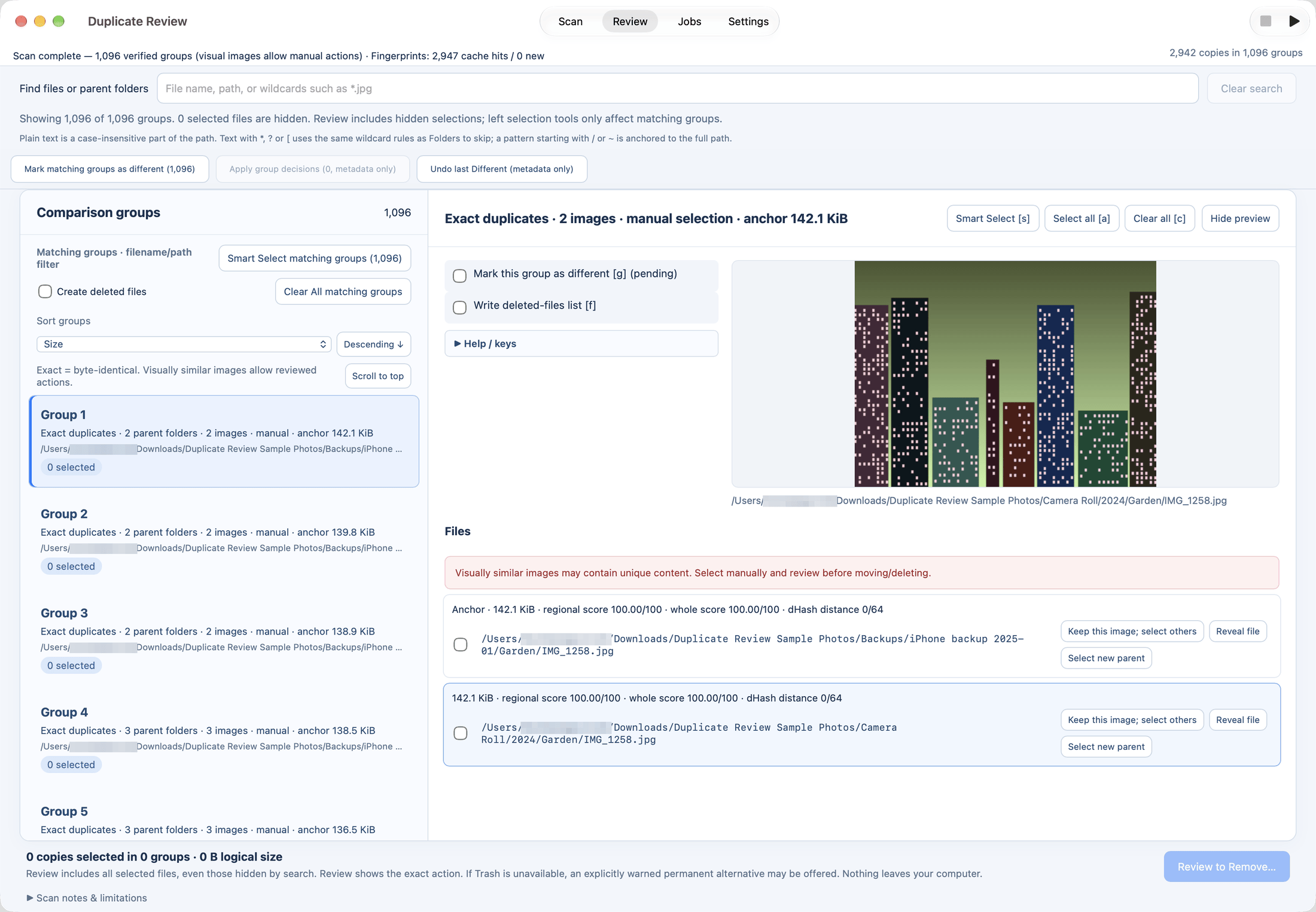
Duplicate Review on a Mac, Review tab with Scan, Review, Jobs and Settings in the toolbar: about 1,100 groups of exact duplicates listed on the left; on the right Group 1, two identical copies of a city-skyline picture with a preview, the anchor file, scores and per-file actions. The user name in the paths is blurred.
Choose exactly what gets scanned

Include and exclude folders with wildcards

Point it at whole libraries, backup drives, or just the folders you care about. Patterns pick folders when the scan starts, and skip rules keep thumbnails, caches and hidden folders out of your results.

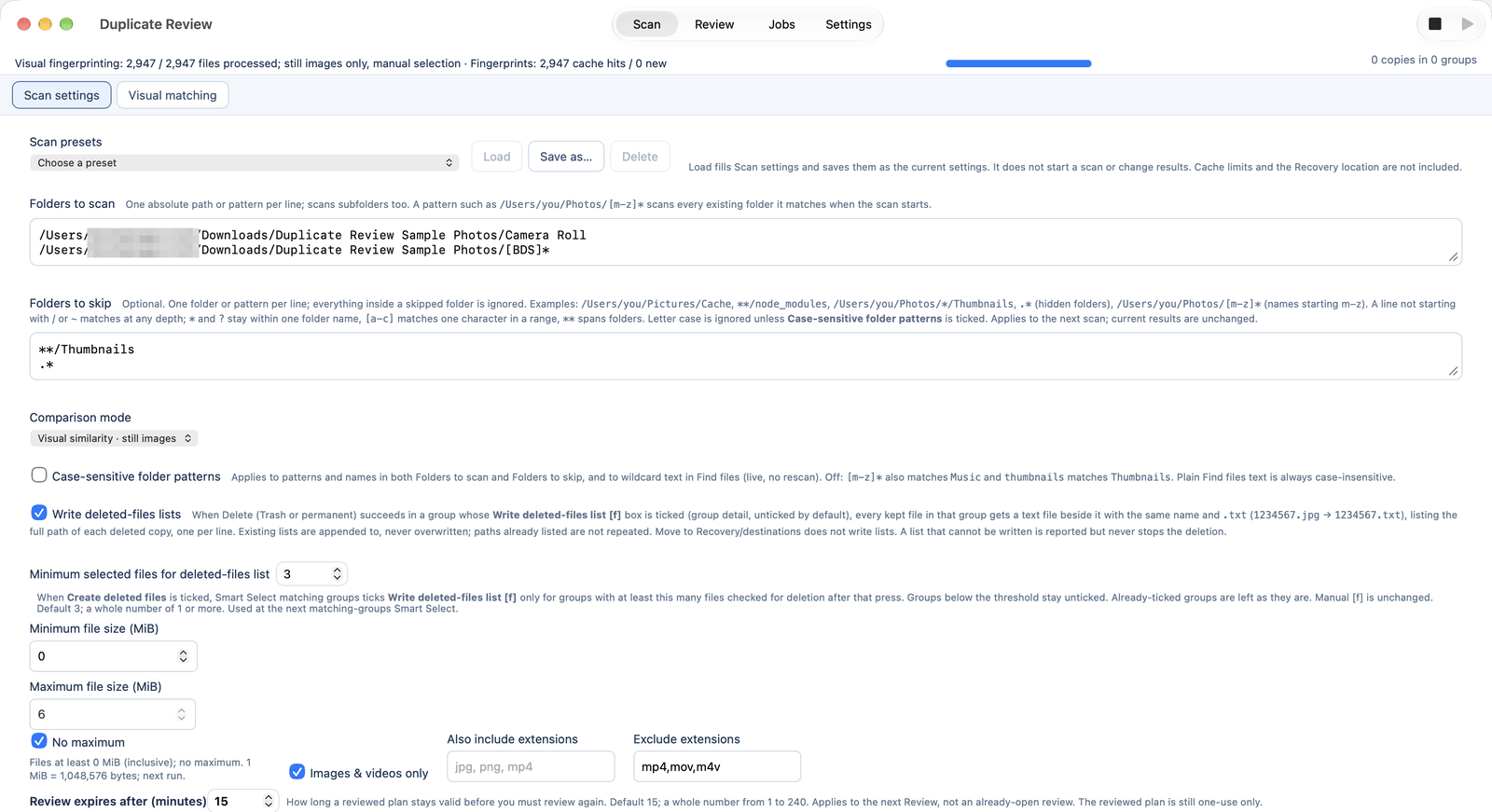
  • ~/Pictures/[BDS]*scan every folder starting with B, D or S
  • **/Thumbnailsskip thumbnail folders at any depth
  • .*skip hidden folders such as .cache
  • /Volumes/Photos/*/Exportsone level of wildcards inside a path

Case-insensitive by default, with a case-sensitive option. The same wildcards also filter results live with Find files.

Scan presets (Pro): save a folder and settings setup under a name, and load it again for the next scan.

Scan settings on a Mac: Folders to scan lists the sample library's Camera Roll folder and the pattern [BDS]* for its other folders; Folders to skip lists **/Thumbnails and .* (hidden folders); Comparison mode is set to visual similarity, still images.
Features

Careful by design, fast on big libraries

Built for libraries with hundreds of thousands of files, and for people who don't want to lose a single original.

Exact + visual matching with scores

Byte-identical duplicates, plus visually similar images such as resized, re-encoded or exported copies. Each copy gets a regional score, a whole-image score and a hash distance, so you can see how close a match is.

Visual matching: Plus & Pro · adjustable thresholds: Pro

Group review with anchor & preview

Every group shows its anchor (the copy to keep), its parent folders and a large preview. Step through files with the keyboard and choose what stays.

Smart Select with folder rules

One click selects every copy except the best original. Folder rules handle copies spread across separate folders, with a configurable count and tolerance.

All-groups Smart Select & folder rules: Pro

Different marks

Mark groups that look alike but aren't duplicates, such as bursts or edits you want to keep. They stay out of future results, and you can undo a mark at any time.

Plus & Pro

Review page, expiry & re-check

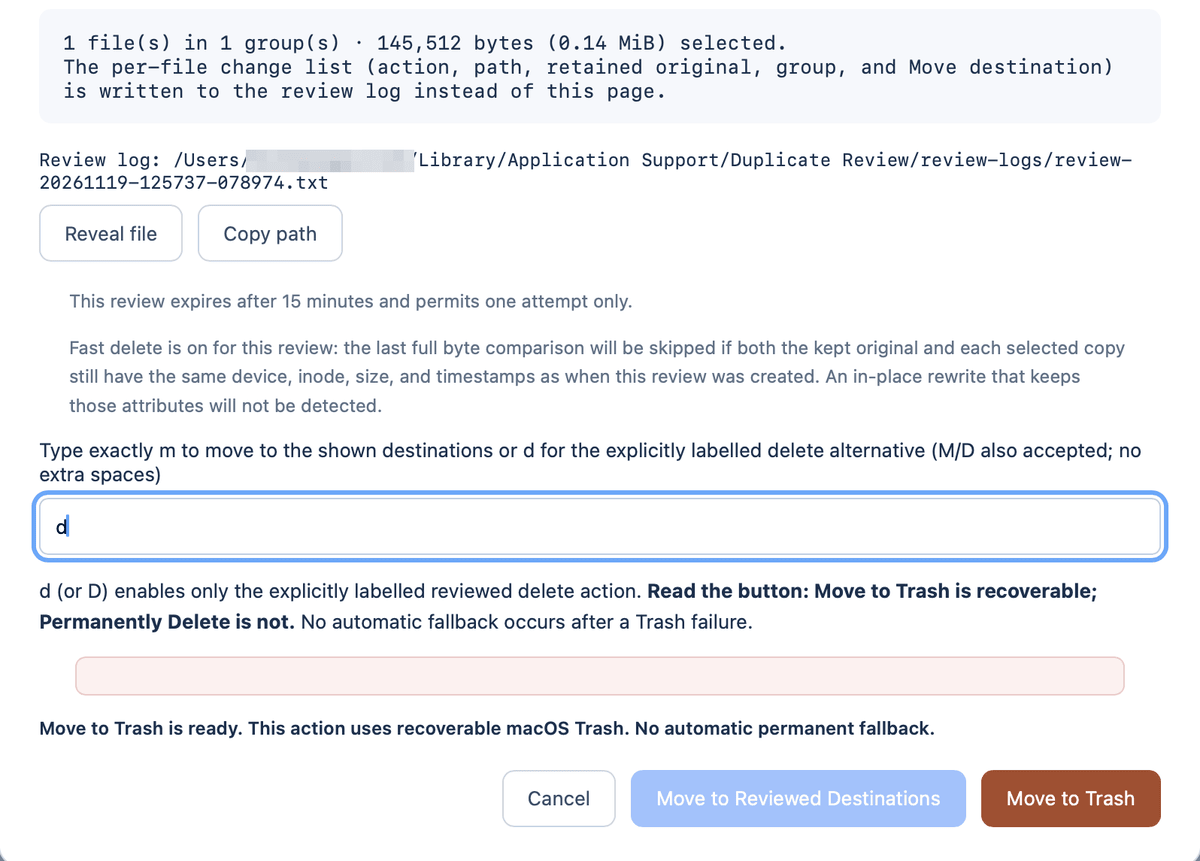
Before anything moves you get a review page showing exactly what will happen, written to a log. Reviews expire after a set time, and each file is checked again right before it's acted on.

Trash by default, with logs

Copies go to the macOS Trash, so you can put them back. Every action is logged. Permanent delete, moving to a folder and deleted-files lists are explicit, separate choices.

Background job queue

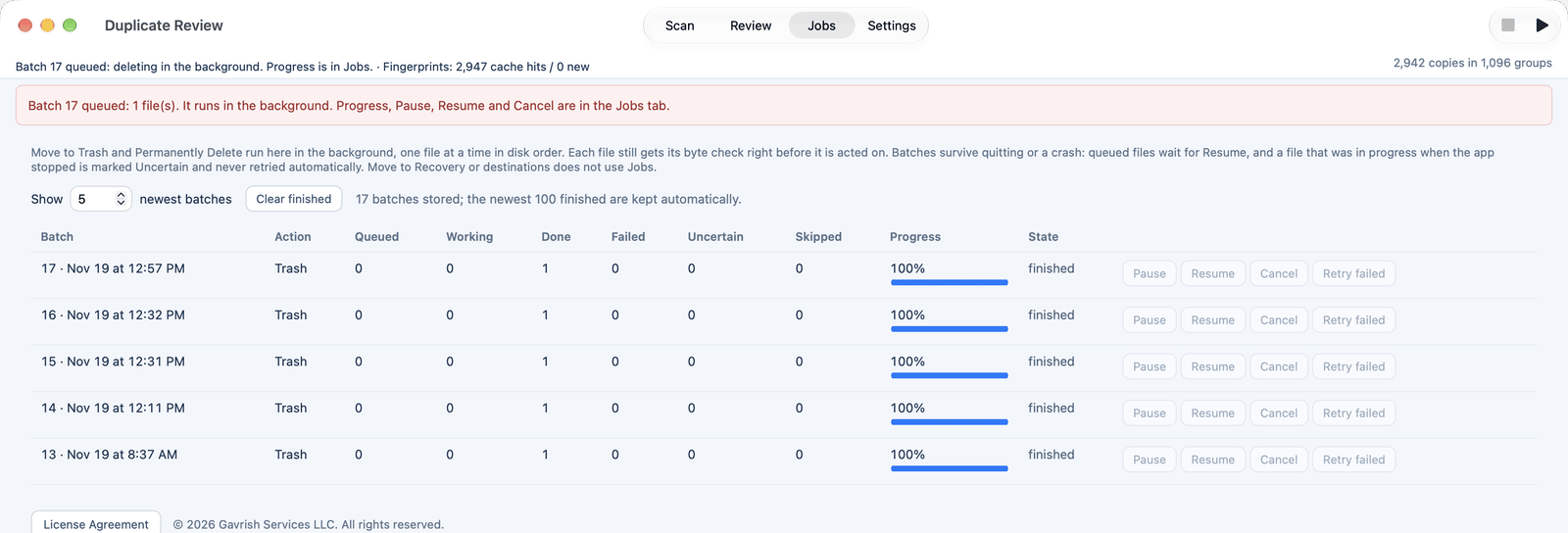
Large batches run in the background with progress, Pause, Resume and Cancel in the Jobs panel. A batch survives quitting or a crash and resumes where it stopped.

Pro

Big-library performance

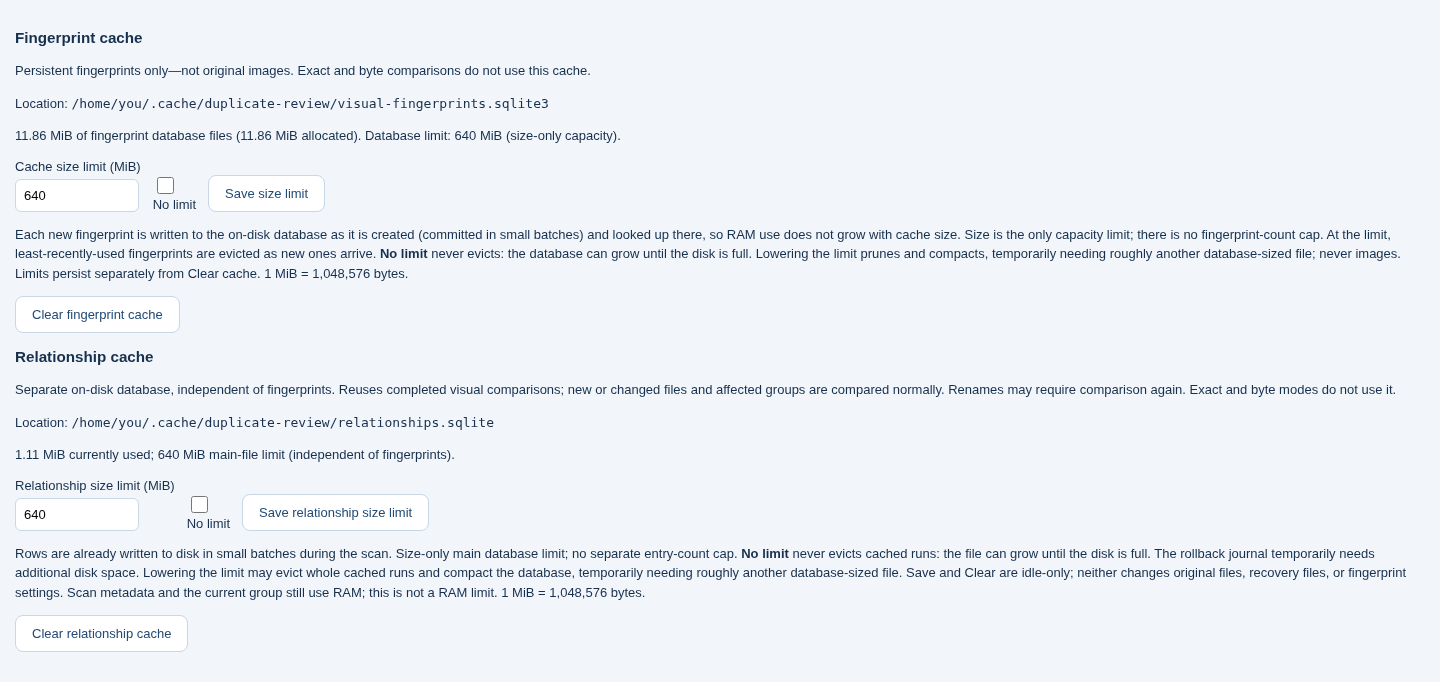
Fingerprints and visual comparisons are cached on disk, so rescanning a large library skips everything that hasn't changed. Cache size limits are yours to set.

Private, on-device

No account, no upload, no analytics. Scanning, previews and caches stay on your Mac, and the interface talks only to the app itself.

Screenshots

The real app, not a mockup

These are screenshots of the current Mac app with Pro registered, scanning a generated sample library of about 3,000 pictures; the user name in the folder paths is blurred. The hero, folder and Jobs images switch to their dark versions when your device uses a dark appearance. The Visual caches image is an earlier capture taken in a browser on a Linux test machine, so its toolbar is drawn as an in-window tab bar.

Pricing

Start free. Pay once.

Plus and Pro are one-time purchases with a license key, not subscriptions. Prices are shown in your local currency when Paddle can detect your location.

Free

$0

For a quick cleanup of exact copies.

  • Exact (byte-identical) duplicates
  • Group review, preview & review page
  • Move to Trash with logs
  • Up to 2 folders
  • Up to 10,000 files per scan
  • Visual matching
  • Wildcard include/exclude
Download Free

Plus

$10 one-time

For finding every look-alike copy.

  • Everything in Free
  • Visual matching with scores
  • Unlimited folders & files
  • Wildcard include/exclude folders
  • Different marks
  • Smart Select across all groups
  • Background job queue

Pro Best value

$20 one-time

For whole libraries and backup drives.

  • Everything in Plus
  • Smart Select across all groups, with folder rules
  • Background job queue
  • Permanent delete, move & deleted-files lists
  • Unlimited caches
  • Scan presets: save and load named scan setups
  • Adjustable visual matching thresholds

Upgrading later costs $15. Moving from Plus to Pro is $15, not the $10 difference between the US prices, so buying Pro up front ($20) saves $5 compared with Plus now and the upgrade later ($10 + $15 = $25). Already have Plus? Sign in to upgrade.

Compare plans
FeatureFreePlusPro
Price (one-time)$0$10$20
Exact duplicates, review, TrashYesYesYes
Folders per scan2UnlimitedUnlimited
Files per scan10,000UnlimitedUnlimited
Wildcard include/excludeNoYesYes
Visual matchingNoYesYes
Different marksNoYesYes
Smart SelectCurrent groupCurrent groupAll groups + folder rules
Background job queueNoNoYes
Permanent delete, move, deleted-files listsNoNoYes
Fingerprint & relationship cachesLimitedLimitedUnlimited
Scan presets: save and load named scan setupsNoNoYes
Adjustable visual matching thresholdsNoNoYes
Upgrade to Pro laterBuy Pro, $20$15Not needed
Before you download

System requirements

For the Mac app. Anything marked as an estimate is based on how the app stores data, or on a Linux measurement, not on a timed run of a 400,000-file library on a Mac.

Minimum

  • macOS 27 or later. The bundled Python runtime requires it; the exact minimum is also stored in the app.
  • A Mac with Apple silicon or an Intel processor, matching the installer you download. The app is built for one CPU architecture at a time, not as a universal binary.
  • Enough free disk space for the photos you scan — they stay where they are — plus cache space on your Mac's startup disk, described under Recommended.
  • Permission to the folders you scan. You can pick folders with the Mac folder dialog or enter their paths. macOS may ask for access to Desktop, Documents, Downloads, and external or network volumes. Some protected locations may also need Full Disk Access in System Settings > Privacy & Security.

Recommended

  • Apple silicon. The current Mac build is produced as a native-architecture app; an Apple silicon Mac is the intended and verified machine for that build.
  • 8–16 GB of memory for libraries of around 400,000 images. This is an estimate: visual matching keeps about 1.1 GiB of fingerprint pixel data in memory at that size (3,072 bytes per image), plus the app's working data, so 8 GB can be tight and 16 GB is more comfortable. Peak memory on a Mac at that scale has not been measured here.
  • An SSD for the Mac's startup disk, where caches are stored. Scanning a large library from a hard disk or a slow external drive takes much longer; the cache itself lives on the startup disk, not on the photo drive.
  • Several gigabytes free on that startup disk for caches. The fingerprint cache is about 4 KiB per image (measured at 4,166 bytes per image at 1,000 images on Linux), so around 1.6 GiB for 400,000 images. The relationship cache is separate and defaults to a 640 MiB cap, or more if you choose No limit. These are estimates; actual size varies with SQLite overhead and how many similar pairs are found. Caches go in ~/Library/Caches/Duplicate Review and are not written if your Home folder isn't on the system data volume.
  • External drives formatted as APFS, Mac OS Extended (HFS+), or exFAT. The app scans folders you choose on internal, external, and network volumes. Files sent to Trash on an external drive go to that drive's system Trash (its hidden .Trashes folder) through macOS, not a substitute. Caches stay on the startup disk regardless of the photo drive's format.

The app does not need Python, Homebrew or Xcode to run, only to build. No accounts, uploads or tracking.

FAQ

Questions

Where do I get it?

From this site, not the Mac App Store. The Mac download is coming soon; see the download page.

What do I need to run it?

macOS 27 or later, on a Mac whose processor matches the installer you download. Apple silicon is recommended. You'll need permission to the folders you scan, and cache space on your startup disk. See System requirements for the full minimum and recommended list, including memory and disk estimates for large libraries.

Does anything leave my Mac?

No. There's no account and no upload or analytics. Scanning, previews, fingerprints and logs all stay on your Mac, and the app only connects to itself.

Can I get my files back?

By default copies go to the macOS Trash, where you can put them back with Finder. Every action is logged with the original path. Permanent delete is a separate, clearly labelled option.

What's the difference between Plus and Pro?

Plus ($10) adds visual matching, unlimited folders and files with wildcard include/exclude, and Different marks. Pro ($20) adds everything in Plus plus Smart Select across all groups with folder rules, the background job queue, permanent delete, move and deleted-files lists, unlimited caches, scan presets (save and load named scan setups), and adjustable visual matching thresholds.

How do license keys work?

Each purchase gets its own license key: one long code that starts with DR-PLUS- or DR-PRO-, followed by 25 groups of 5 letters and digits, such as DR-PRO-7Q2KD-M4XWA-…. Copy the whole key from your purchase email into Settings › Register in the app (on a Mac also Duplicate Review › Enter License…) to unlock that tier. The key is checked on your Mac, without contacting a server. It's the same download for every tier, so Free installs upgrade in place, and your settings and caches stay as they are.

Can I upgrade from Plus to Pro later?

Yes. Sign in on the upgrade page with the email you used to buy Plus, then upgrade from your account. Upgrading later costs $15, not the $10 difference, so buying Pro up front ($20) saves $5. Your new Pro license key replaces the Plus one.

What is the refund policy?

You can ask for a refund within 14 days of your purchase. Paddle, our reseller and Merchant of Record, handles refunds: visit paddle.net or use the link in your receipt. If a refund is issued, that license key is revoked. Local consumer law may give you more rights. See the full Refund Policy.